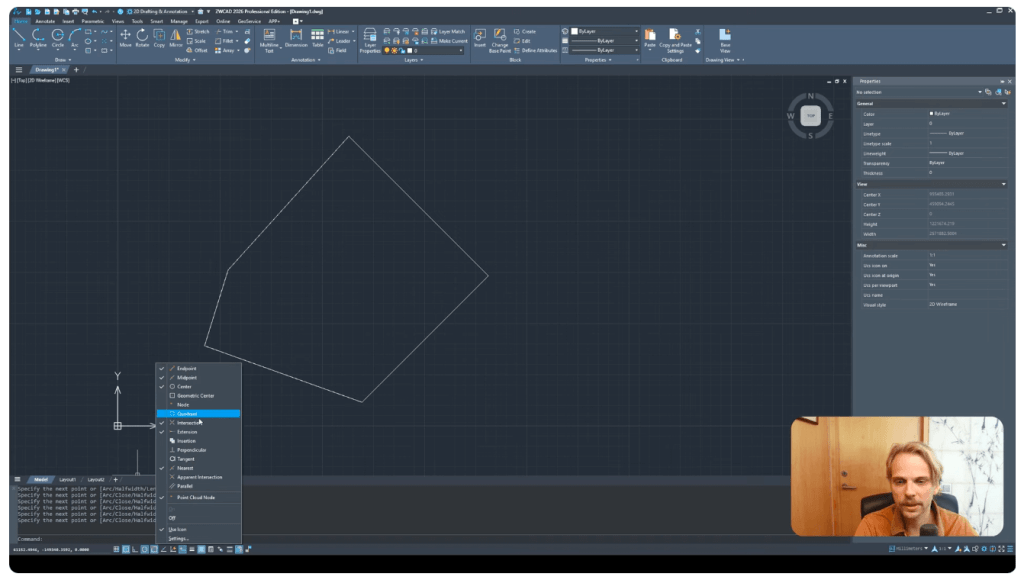
ZWCAD 2026 features a user interface that is nearly identical to the most widely used CAD software on the market, enabling simple and fast adaptation for all users accustomed to working in AutoCAD. The tool palette, icon layout, as well as the functionality of the command line, are fully aligned with professional standards, making the transition from one software solution to another require minimal learning and adjustment.
One of the key benefits is that the command line operates exactly as experienced users would expect—it supports all standard commands, and the object snap system works both visually and functionally the same as in competing solutions, with nearly identical icons for snapping points. This consistency in both the visual and functional aspects of the interface significantly facilitates migration, reduces the risk of errors during work, and increases operational efficiency when switching from AutoCAD to ZWCAD.
According to practitioners, DWG files created in ZWCAD can be shared with AutoCAD users without any issues. Likewise, importing DWG files created in AutoCAD proceeds smoothly and with complete compatibility. Experience has shown that interoperability between these two software solutions is at an exceptionally high level, ensuring a reliable and continuous workflow without the need for additional conversions or concerns about data loss. This outstanding consistency in working with the DWG format is one of the most important advantages of ZWCAD in everyday engineering and design practice.
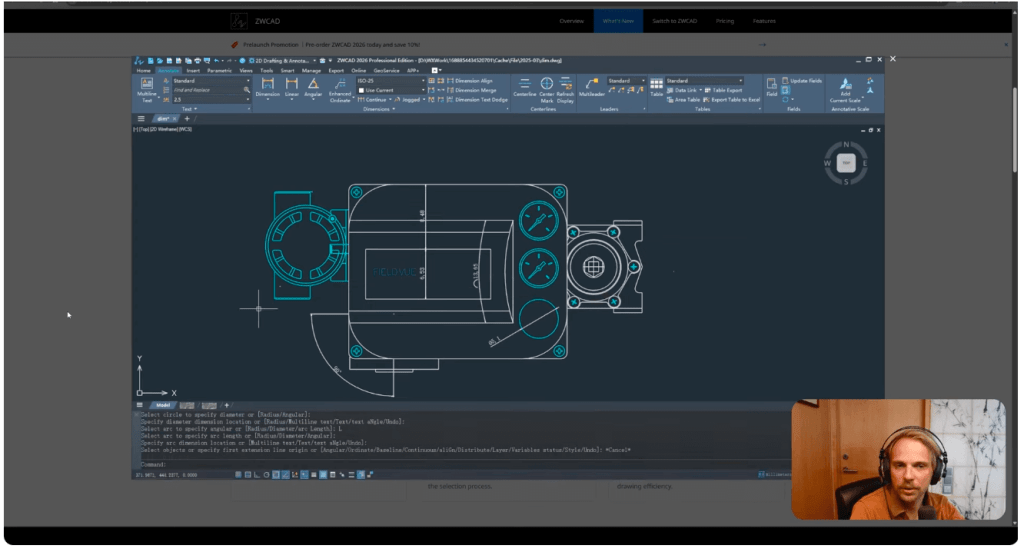
One of the most useful innovations in ZWCAD 2026 is the Smart Dimension feature, which fully automates the dimensioning process on technical drawings. This tool intelligently recognizes the type of object the user selects (line, arc, circle, polyline, etc.) and automatically suggests the most appropriate dimension type—whether it is linear, angular, radial, or diameter dimensioning. In this way, the process of placing dimensions becomes not only faster but also significantly more intuitive, which is especially important when creating complex technical solutions where precision is critical.
The implementation of Smart Dimension functionality allows engineers and designers to accurately place required dimensions in just a few clicks, without the need to manually select the appropriate dimension type or make repeated adjustments. This automatic recognition of object types and automatic dimension selection significantly reduces the possibility of errors and contributes to the uniformity of technical documentation, which is essential for professional practice.
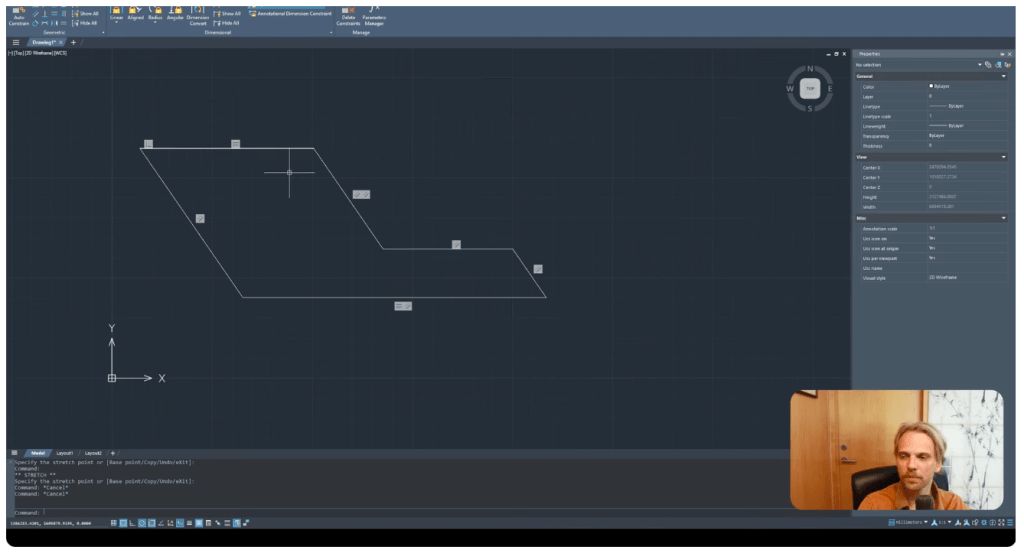
One of the most significant innovations introduced in ZWCAD 2026 is the implementation of parametric modeling, which allows users to have complete control over drawing geometry through defined constraints and dimensions. This functionality enables elements in the drawing to be interlinked so that any change in value automatically updates the entire drawing, without the need for manual adjustments. In this way, design becomes much more efficient, and the creation of technical documentation more precise and reliable.
Through a practical example of working with an L-shaped polyline, Gediminas demonstrates how to apply geometric constraints—horizontal, coincident, and parallel—in order to establish fixed relationships between individual drawing elements. Such rules guarantee that the shape will retain its defined structure, regardless of point movement or changes to other parameters.
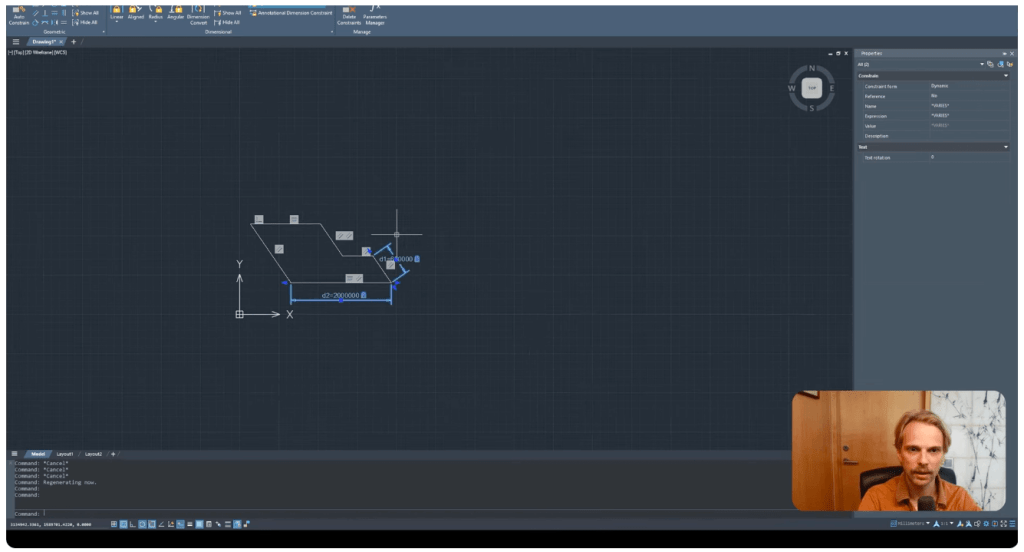
After defining geometric relationships, dimensional constraints are added to precisely lock specific measurements. By changing the entered dimension values, the geometry of the entire model is automatically updated, enabling dynamic, iterative design and high flexibility in all stages of technical solution development. This approach is especially useful when creating drawings that require adaptability or rely on predefined design rules (rule-based design).
Parametric modeling in ZWCAD 2026 significantly improves work efficiency and reduces the possibility of errors, as it allows engineers and designers to obtain optimal solutions through rapid parameter changes without the need to reconstruct the entire drawing. This represents a major step forward toward modern standards in the field of CAD design and positions ZWCAD as an advanced solution for engineering, architectural, and industrial applications.
In addition to major functional innovations such as Similar Search and Smart Match, ZWCAD 2026 also introduces numerous smaller yet highly important upgrades that directly impact the efficiency of everyday work. These incremental innovations, combined with advanced automated features, clearly demonstrate the strategic direction of ZWCAD software development—focusing on automation, accelerating workflows, and reducing manual input.
This very approach enables professionals to achieve a higher level of productivity, reduce the time required to produce documentation, and further improve accuracy at every stage of design. This is the result that a significant number of users, including Gediminas, have long been striving for in their daily work with CAD tools.
One of the highly advanced functionalities that distinguishes ZWCAD 2026 in the CAD solutions market is the ability to create and edit dynamic blocks, known as Flexiblock. This feature enables designers and engineers to develop intelligent blocks that can be flexibly adapted to various project requirements, without the need for manual drawing and editing of each individual element.
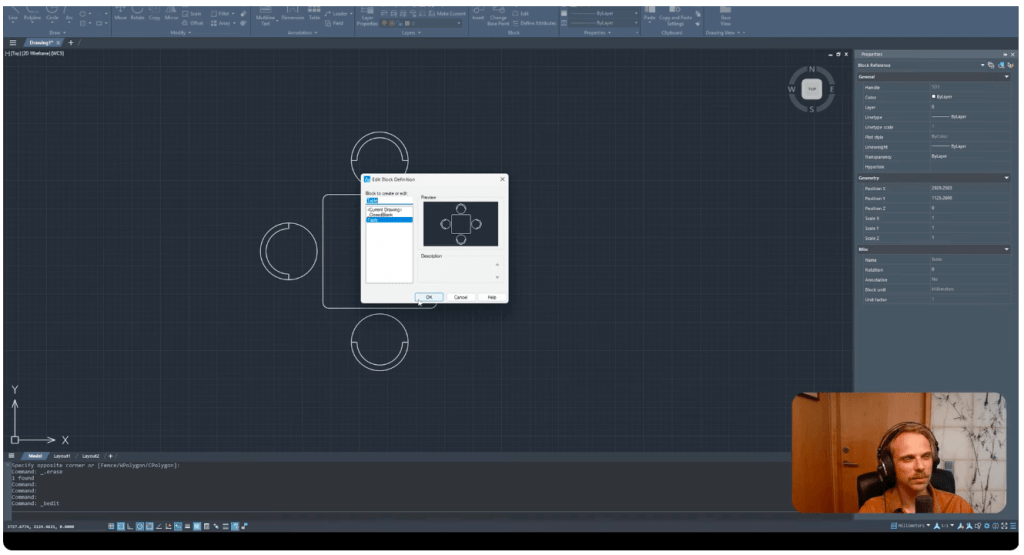
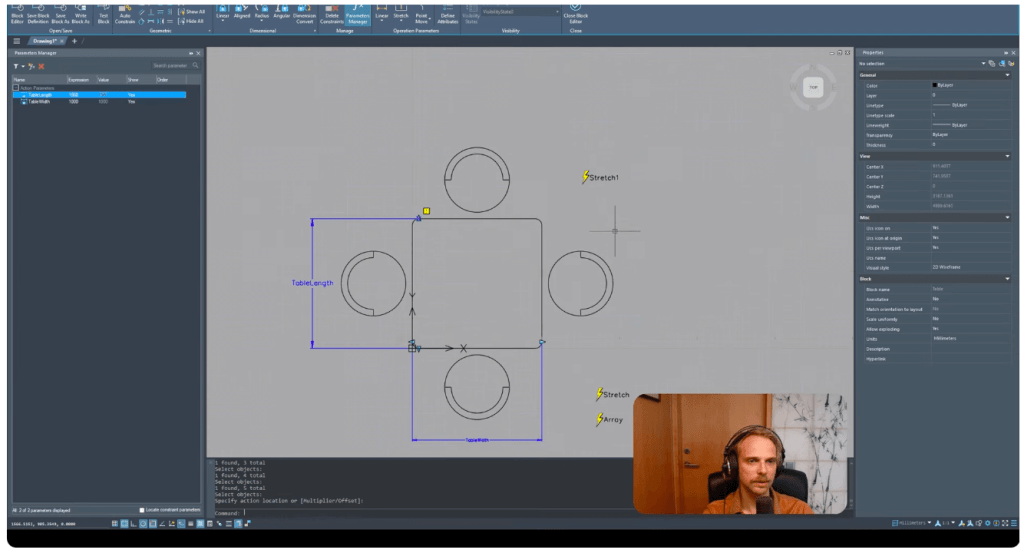
As a practical example, Gediminas demonstrates the creation of a complete set of a table with chairs, which he then converts into a block. In the initial phase, such a block does not have dynamic characteristics—it can only be translated, rotated, or scaled as a whole, without the possibility of interactive parameter adjustment.
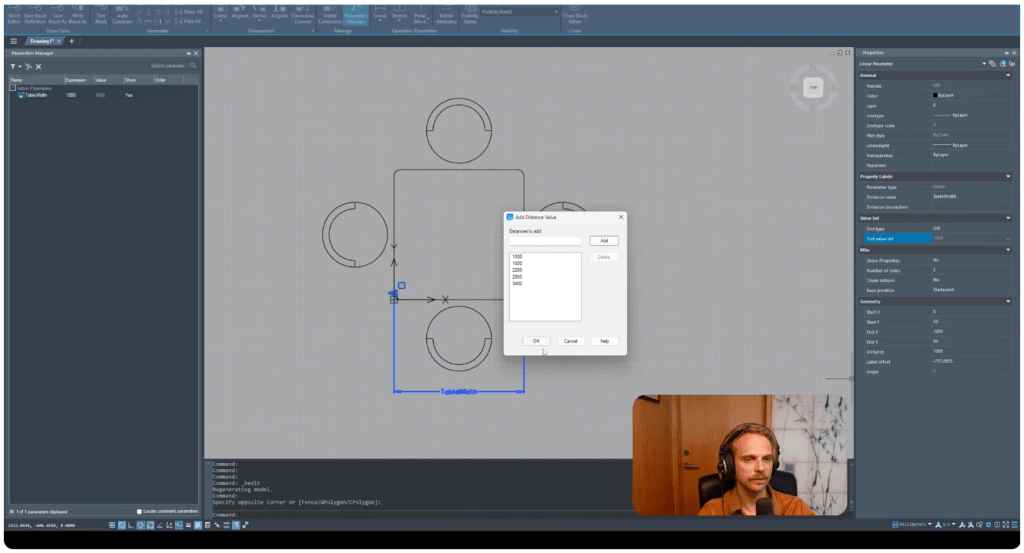
To make this block truly functional and adaptable, Gediminas enters the block editor and adds a linear parameter that defines the width of the table. This parameter is linked to a stretch action, allowing the user to easily and interactively change the block’s dimension directly on the drawing using grips. For even greater efficiency, a list of standard values is defined (for example: 1600, 2200, 2800, 3400 mm), so the user can select from predefined lengths, minimizing the risk of input errors and ensuring compliance with design standards.
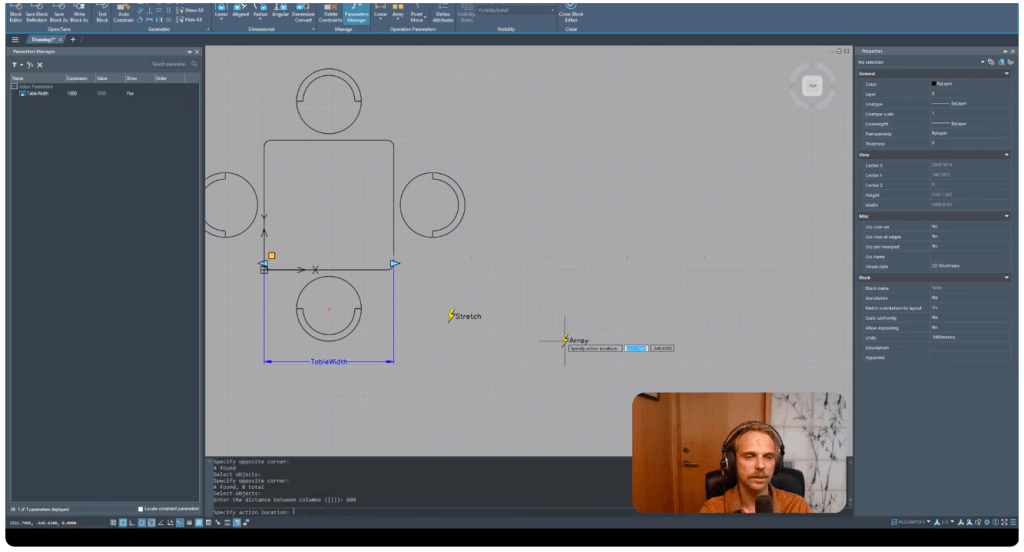
The advancement over traditional blocks is reflected in the ability for dynamic adjustment of the number of chairs based on the width of the table. By adding an array action, the number of chairs is automatically synchronized with the selected width, maintaining a defined spacing (e.g., 600 mm). In this way, whenever the user changes the table width, the arrangement and number of chairs are automatically updated, without the need for manual editing of the block.
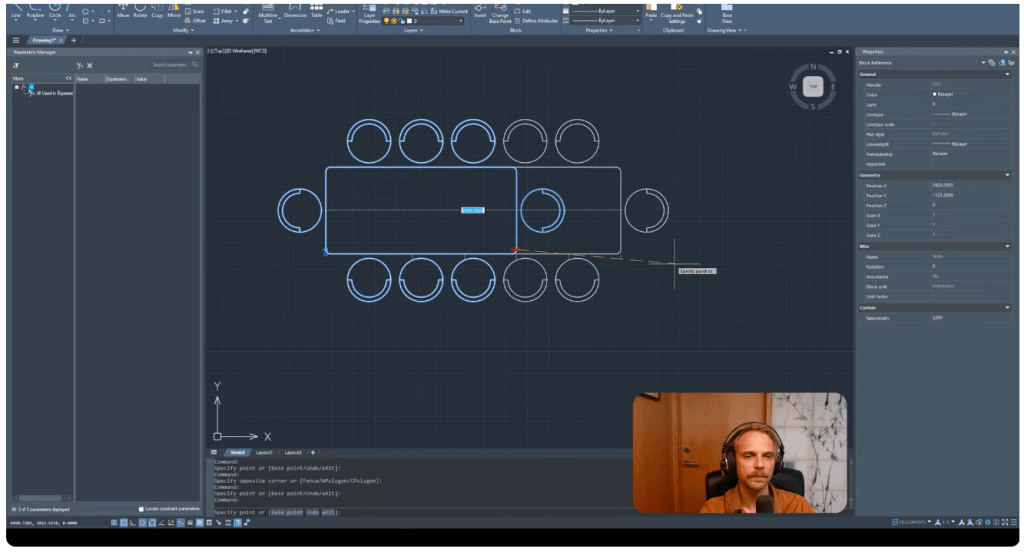
As a final step, Gediminas adds another linear parameter with a stretch action, this time for the length of the table. This enables the Flexiblock to be scaled along both axes (X and Y), making it possible to create a wide range of design variations according to the specific requirements of the project.
If certain options may require additional adjustment for complete workflow optimization, it is clear that Flexiblock in ZWCAD 2026 significantly enhances flexibility and productivity when creating reusable design components. This approach enables standardization, accelerates the drawing process, and reduces the possibility of errors, which is essential for any organization striving for digitalization and optimization of project workflows.
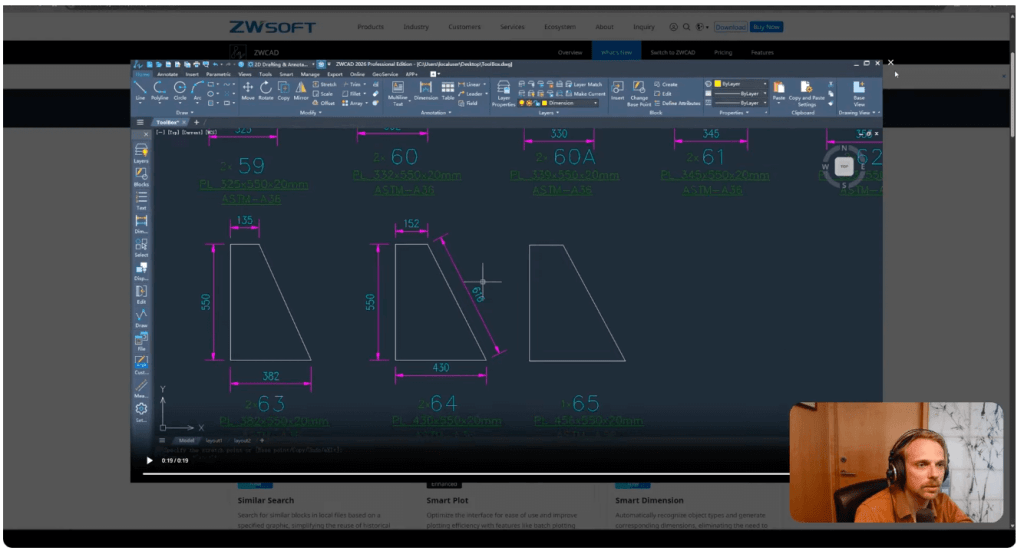
ZWCAD 2026 brings an entire collection of specialized tools under the name Toolbox, whose main purpose is to significantly enhance efficiency in everyday design work. These tools are carefully designed to automate routine tasks, reduce the number of manual operations, and contribute to greater accuracy in technical documentation.
As an illustration, there is a tool that automatically places dimensions on selected objects, with predefined distances between dimension lines. This functionality supports both linear and aligned dimensioning, allowing users to precisely dimension entire segments of a drawing in just a few steps, which in practice saves valuable time and eliminates the risk of errors that can occur with manual entry.
Toolbox is continuously improved and expanded with new features, and according to feedback from practitioners, it represents one of the most significant segments of ZWCAD when it comes to continuous productivity enhancement. For this very reason, Toolbox has been recognized as one of the most sought-after functionalities among engineers, designers, and all users who strive for automation and optimization of their workflows.
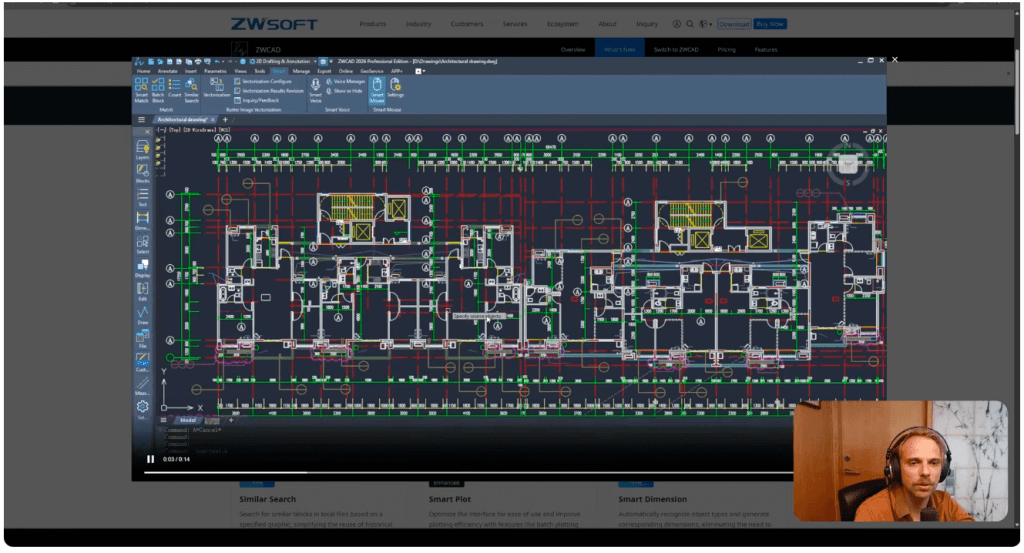
One of the innovative features introduced in ZWCAD 2026 is Smart Match—a tool that enables fast and precise identification of all identical or visually similar objects in a drawing, regardless of whether they are blocks or other graphic elements. This option significantly improves control over the content of complex technical drawings and allows users to organize and optimize their workspace more efficiently.
The operating principle of the Smart Match function is based on selecting one or more reference objects that the user wants to keep in the drawing. The tool then automatically identifies all instances that are identical or sufficiently similar to the specified references. The user is then given the option to easily isolate, group, or remove all redundant objects, thereby making the drawing editing process much faster and simpler.
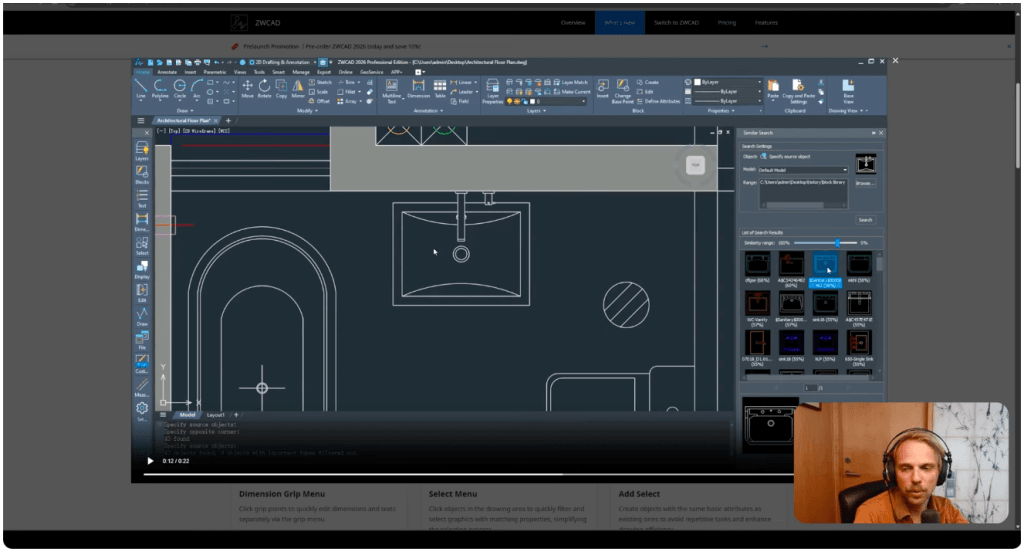
ZWCAD 2026 introduces the advanced Similar Search option, developed primarily for working with blocks, which significantly raises the level of automation in everyday design processes. This functionality allows users to simply select one block (for example, a sink) and initiate an automatic search of the entire CAD library to identify all blocks that are visually or structurally similar to the selected model.
The underlying technology is based on the use of modern algorithms from the field of computer vision, which analyze the geometric characteristics of the block—shape, proportions, and the arrangement of elements—and, based on this, detect similar blocks even if they are not completely identical. In this way, designers can quickly identify all relevant elements in a project or library, without the need to manually compare and review each individual block.
This functionality is especially useful in situations where it is necessary to replace or standardize certain elements within complex drawings. Instead of lengthy and laborious searching, Similar Search enables quick location of all relevant blocks and their batch replacement, which significantly accelerates and simplifies the entire workflow.
By using the Similar Search tool, design teams achieve a higher level of organization, increase precision, and make the process of creating and updating technical documentation much more efficient. This is yet another example of how ZWCAD 2026 keeps pace with modern trends in CAD software development and provides engineers with tools for intelligent and automated project control.
Contact for more information: PLM Dynamics – ZWCAD (consulting, demo presentations, and implementation support).